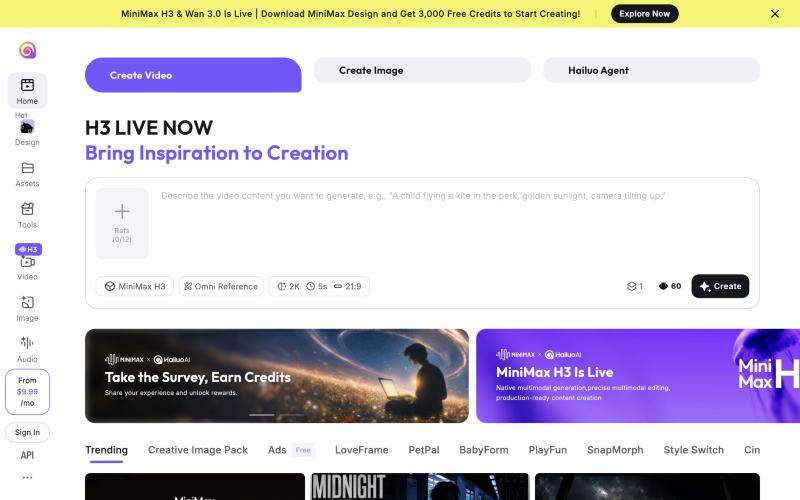
Hailuo AI is MiniMax’s video generator, available in the browser and as a mobile app. You type a prompt or upload an image, and it renders clips from a few seconds up to 15 seconds, keeping characters and settings consistent with reference images. The newest model is MiniMax H3; the same account also includes Hailuo 2.3, Sora 2, Veo 3.1, lip sync, music and sound tools, plus several image models. Prices change almost weekly and Hailuo’s own pages disagree with each other in places, so this review lists what we found and where the conflicts are before you pay.
Some links in this review are affiliate links. We may earn a commission if you buy a paid plan through them, at no extra cost to you. Plans, credit costs and policies were checked on Hailuo’s pricing page, FAQ, Terms of Paid Service and Terms of Service on October 12, 2026. We have not used Hailuo in our own videos yet, so this review gives no score.
Verdict
- Best for: creators and marketers making short AI shots, ads and social clips where the same character or product has to look the same across scenes.
- Standout: MiniMax H3 accepts up to 12 reference images and renders 4 to 15 second clips up to 2K. Failed generations do not cost credits.
- Watch out for: no refunds, monthly credits do not roll over, and the two sets of terms disagree on commercial use.
- Price: one-time free trial credits with a watermark. Standard lists at $14.99/month; on October 12, 2026 it was $10.50 monthly or $8.40/month billed yearly.
🎟️ Code BIZMATE: an extra 10% off your first Hailuo AI subscription. Hailuo issued the code to Funova on October 12, 2026; enter it in capitals at checkout. We have not tested it with a purchase. Funova earns a commission when you use it, at no extra cost to you.
What Hailuo AI does
- Text-to-video and image-to-video: MiniMax H3 makes 4 to 15 second clips at 768p or 2K. H3 Max is cheaper, at 480p or 768p for 5 to 15 seconds.
- Consistent characters: Omni Reference takes up to 12 images of a person, product or location and reuses them in the shot.
- Older, cheaper models: Hailuo 2.3, 2.3-Fast, 2.0 (with first and last frame control) and 1.0 for 6 to 10 second clips.
- Third-party models: from Standard up, Sora 2 (with audio) and Veo 3.1 run on the same credits.
- Extras: video upscaling, lip sync, music and sound generation, and image models including Nano Banana, Seedream, GPT Image and Midjourney.
Pricing (checked October 12, 2026)
The plan page shows four paid plans. Both monthly and yearly billing were discounted on the day we checked, so expect different numbers when you read this.
| Plan | List price | Monthly (Oct 12) | Billed yearly (Oct 12) | Credits a month | Key limits |
|---|---|---|---|---|---|
| Free | $0 | $0 | $0 | One-time trial credits | Hailuo models only, watermark, queue up to 4 tasks, 1 at a time |
| Standard | $14.99/mo | $10.50 | $8.40/mo ($100.80/yr) | 1,000 | No watermark, Sora 2 and Veo 3.1, Hailuo 2.3 at 1080p, queue 8, 1 at a time |
| Pro | $54.99/mo | $38.00 | $30.40/mo ($364.80/yr) | 4,500 | 10-second Hailuo 2.3 clips, 2 tasks in parallel, unlimited images on selected models |
| Master | $119.99/mo | $89.00 | $71.20/mo ($854.40/yr) | 10,500 | As Pro, queue 12, unlimited images at higher resolution |
| Max | – | $216.00 | $184.00/mo ($2,208/yr) | 27,000 | Unlimited Hailuo 2.0/2.3 in a slower queue |
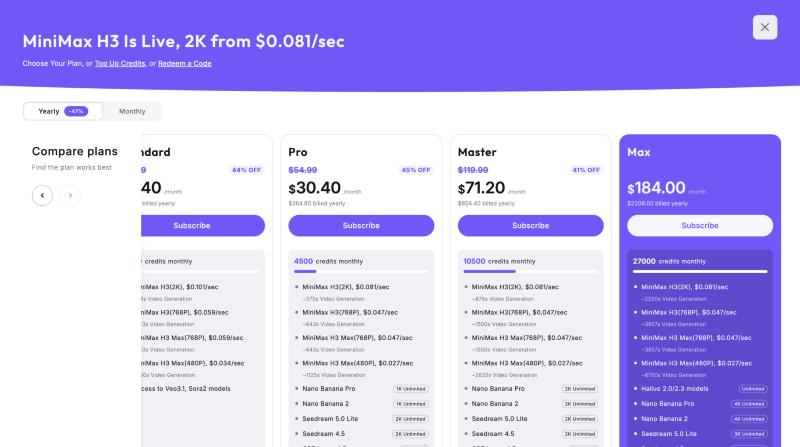
What a second of video costs. The plan cards price H3 per second: about $0.101/sec at 2K on Standard billed yearly and $0.081/sec on Pro and above; billed monthly it is $0.126/sec (Standard) and $0.102/sec (Pro, Master). H3 at 768p costs roughly $0.047 to $0.074/sec depending on the plan. For older models the FAQ lists Hailuo 2.3 at 25 credits for 6 seconds at 768p, 80 credits for 6 seconds at 1080p and 50 credits for 10 seconds at 768p; Sora 2 from 40 credits (4 seconds); Veo 3.1 at 120 credits for 8 seconds (a promotional price, normally 320).
Hailuo’s pages disagree. On October 12, 2026 the FAQ described five plans, adding an Ultra plan at $124.99, and listed Master at $94.99 with 10,000 credits and Max at $199.99 with 20,000 credits. The plan cards had no Ultra, Master at $119.99 with 10,500 credits and Max with 27,000 credits. The site header says “from $9.99/mo”, which matches no plan card. Trust the price shown at checkout, not the FAQ.
Refunds and credits: read this before you buy
- No refunds: both the FAQ and the Terms of Paid Service say payments are not refunded. If you cancel, you keep access until the end of the period and then drop to Free.
- No rollover: unused plan credits expire at the end of each cycle (Terms of Paid Service, section 5).
- Purchased credits: the FAQ says they last one year; the paid terms say until December 31 of the second calendar year after purchase. Ask support if you plan to buy a large pack.
- Failed generations are free: Hailuo states that failed attempts do not use credits.
- User complaints: when we checked Trustpilot on October 9, 2026, a recurring complaint was being charged after cancelling. Cancel well before the renewal date and keep a screenshot of the confirmation.
Can you use Hailuo videos commercially?
This is the most important conflict in Hailuo’s documents:
- Terms of Paid Service (last updated July 14, 2025, section 8) and the FAQ: paid users keep the rights to their output and may use it commercially; watermark-free downloads are yours.
- Terms of Service (last modified August 19, 2026; Nanonoble Pte. Ltd., Singapore law) say the service is for personal, non-commercial use, and that any business use is at your own risk and requires you to secure the rights yourself. They also forbid removing AI labels, watermarks or metadata without written permission, require disclosure of AI content in some cases, and set a minimum age of 16.
The cautious reading: a paid plan grants commercial use under the paid terms, but keep AI labels in place, disclose AI-generated video in ads, and get written confirmation from Hailuo before delivering client work at scale.
Language support and paying from outside the US
The site code lists interface languages including English, Spanish, Portuguese, French, German, Indonesian, Hindi, Japanese, Korean, Russian and Vietnamese. We opened the Vietnamese interface and found untranslated strings and a currency label bug, so expect rough edges in other translations too. Prompts in English give the most predictable results. The text-to-speech list in the site code has 16 entries, from Mandarin and Cantonese to Turkish and Ukrainian; we have not tested voice quality. For multilingual voiceovers, rendering shots in Hailuo and voicing them with ElevenLabs is a safer combination; see our best AI dubbing tools comparison.
Prices are in US dollars. The paid terms name Stripe as the payment processor, and the FAQ covers invoices for purchases made through Apple, so an international card on the web or an App Store purchase should both work. We have not made a purchase.
Quick start: your first clip
- Create an account through our Hailuo AI link.
- Choose Create Video and pick a model: MiniMax H3 for the best quality, H3 Max or Hailuo 2.3 to save credits.
- To keep a character consistent, click Refs and add images of the person, product or location (up to 12).
- Write the prompt in English: subject, action, camera angle, lighting.
- Set resolution, length and aspect ratio (9:16 for TikTok, Reels and Shorts), check the credit cost next to Create, and test at 768p before rendering in 2K.
Pros and cons
| Pros | Cons |
|---|---|
| Strong character consistency with up to 12 reference images | No refunds; users report charges after cancelling |
| Clips up to 15 seconds and 2K with H3 | Commercial-use terms conflict between two documents |
| Failed generations do not use credits | Prices change often; FAQ and plan cards disagree |
| Sora 2 and Veo 3.1 in the same account from Standard | Monthly credits expire; translated interfaces are unfinished |
Who should choose which plan
- Trying it out: use the free trial credits, then one month of Standard monthly. Draft with H3 Max or Hailuo 2.3 at 768p.
- Weekly short-form creators: Pro for parallel jobs and lower per-second costs. Move to yearly only once you know your usage, because nothing is refunded.
- Heavy ad production: Master or Max, but compare with a multi-model subscription first.
Hailuo or another tool?
- Several video models in one plan (Kling, Hailuo, Seedance, Veo, Sora): read our Higgsfield AI review.
- Undecided between Kling, Hailuo and Higgsfield: see the cost of a 5-second clip on each.
- Finished videos with voiceover and captions from a script rather than single shots: read our Zebracat review.
FAQ
Is Hailuo AI free?
New accounts get one-time trial credits for Hailuo models, with a watermark. Removing the watermark and using H3 at 2K regularly needs Standard or higher.
How long can Hailuo videos be?
MiniMax H3 renders 4 to 15 seconds. Hailuo 2.3 renders 6 seconds, or 10 seconds from the Pro plan.
Can I get a refund?
No. Hailuo does not refund payments; if you cancel, you keep access until the paid period ends.
Can I use Hailuo videos in ads?
The paid-plan terms allow commercial use, while the general terms say personal use only. For ads, use a paid plan, keep AI labels, and ask Hailuo in writing for large client projects.
Is Hailuo the same as MiniMax?
Yes. Hailuo AI is MiniMax’s consumer video app, and MiniMax H3 is its latest video model. The terms name Nanonoble Pte. Ltd. in Singapore as the operator.